
Live Now
TruckIT · Product Update

TL;DR
What’s New
– Bulk Dispatch for Offline Hauler Trucks Web
– Default Geozone Radius for Sites Web Mob
– Refresh Tickets Without Losing Filters Web
– Archive Restricted Customers Web Mob
Quality-of-Life Fixes
– Clearer Truck Archiving Errors Web
– Deleted Jobs No Longer Block Archiving Web
– Sites Map Pins When Zoomed Out Web
– Inspectors Can See Job Custom Fields Web
– Archived Job Templates Stop Creating Jobs Web
– Cost Report Tonnage Fix Web
– Classic Status Colors on Project Payloads Web
– Loads & Cubic Yards Display Fix Mob
– Remove Company Admins Mob
– Location & Permission Errors Fixed Mob
– More Secure Sign-In Mob
Web Portal — What’s New
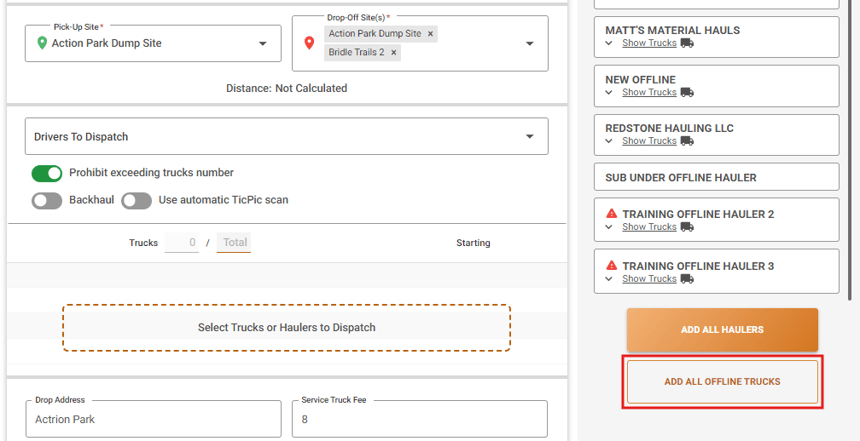
Bulk Dispatch for Offline Hauler Trucks
What it isYou can now select several trucks from an offline hauler (a hauler that doesn’t use TruckIT) and dispatch them to a job in one step, instead of one truck at a time.
Why you’ll careIf you rely on outside haulers for big jobs, filling the order takes a few clicks instead of a long round of repeated dispatches.
Default Geozone Radius for Sites
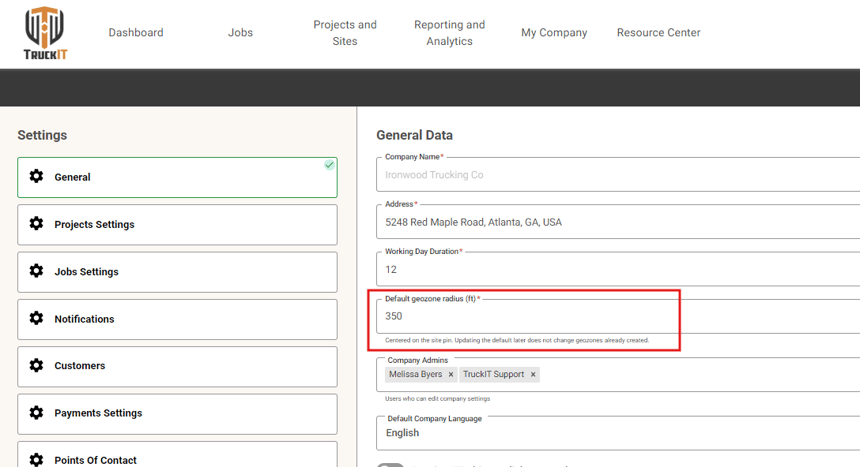
What it isA new setting lets you choose a default geozone radius for your company. The geozone is the area around a site that TruckIT uses to tell when a truck has arrived or left.
Why you’ll careSet the radius that fits your sites once, instead of adjusting it site by site. It works on the web portal and in the mobile app. See the Mobile section below for more.
Refresh Tickets Without Losing Filters
What it isThe Tickets list now has a refresh option that loads the latest tickets and keeps the filters you’ve already set.
Why you’ll careKeep an eye on incoming tickets throughout the day without rebuilding your view every time.
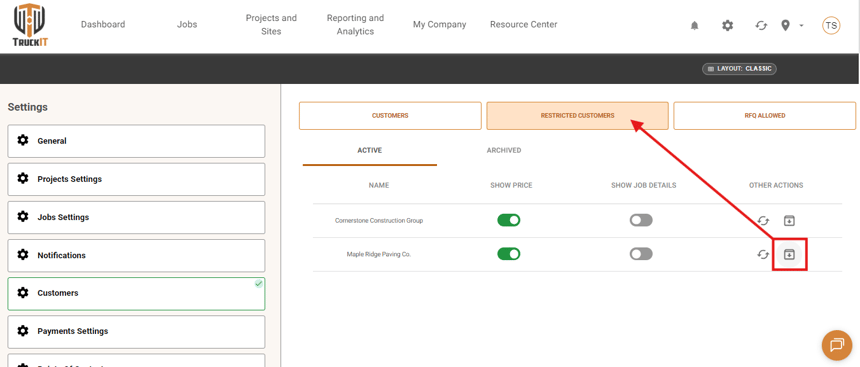
Archive Restricted Customers
What it isYou can now archive a restricted customer right from the Restricted Customers tab. Archived restricted customers also no longer appear in the project selector in the mobile app.
Why you’ll careClear out customers you no longer work with, so your lists stay short and your team doesn’t pick the wrong one.
Suggested action: Set your company’s default geozone radius in Settings, then archive any restricted customers you no longer work with.
Mobile App — What’s New
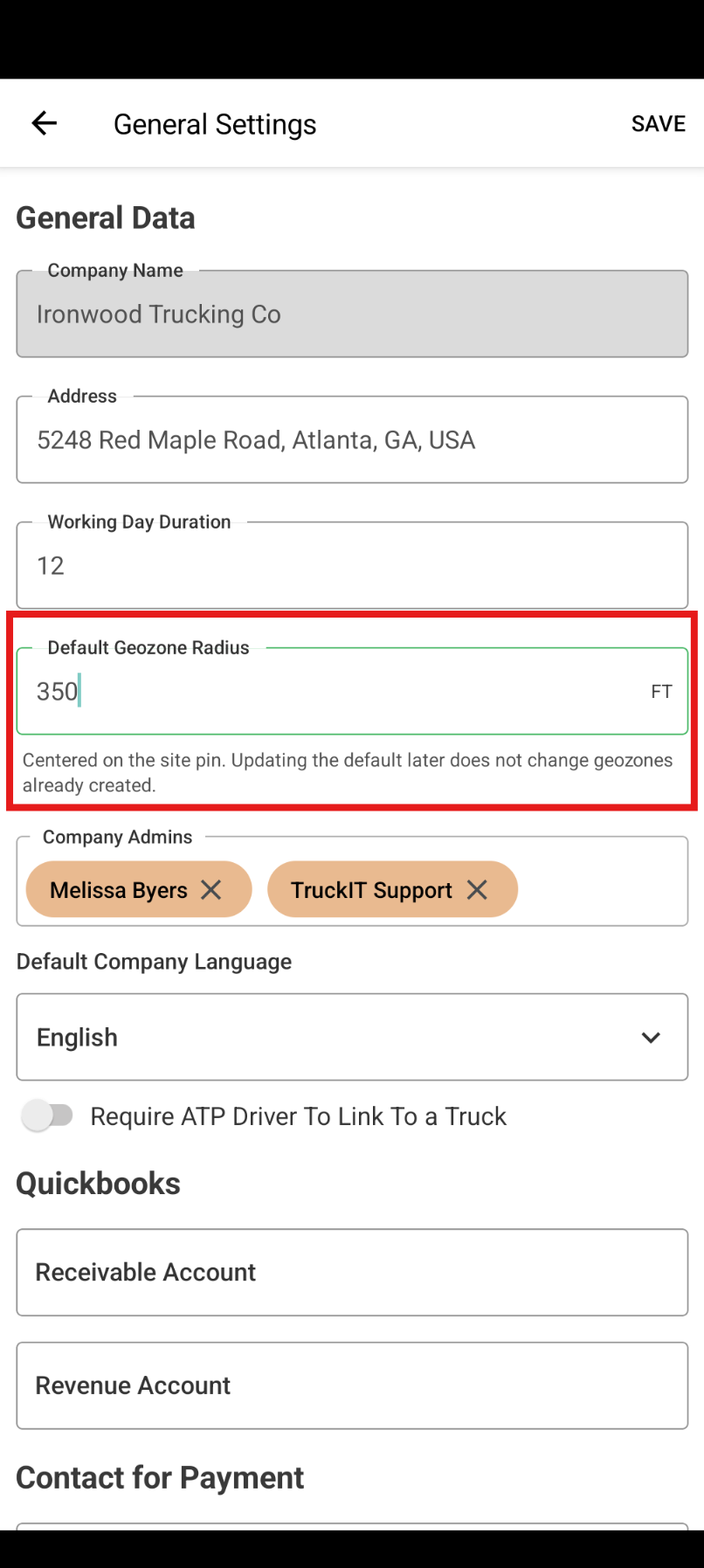
Default Geozone Radius for Sites
What it isThe default geozone radius setting is now in the app too. The geozone is the area around a site that TruckIT uses to tell when a truck has arrived or left.
Why you’ll careManage your sites from the field with the same default your office uses, so arrival and departure tracking stays consistent.
Suggested action: Update to the latest version of the TruckIT app to get the geozone radius setting and this sprint’s fixes.
Quality-of-Life Fixes
Clearer Truck Archiving Errors Web
If a truck can’t be archived, the error message in My Fleet now lists the Job ID and Ticket ID that are blocking it. Other truck errors are also more specific.
Deleted Jobs No Longer Block Archiving Web
Deleted jobs and tickets no longer stop you from archiving a truck, payload, or site.
Sites Map Pins When Zoomed Out Web
The Sites map now shows site pins and groups when you zoom far out.
Inspectors Can See Job Custom Fields Web
Inspectors with permission to view job custom fields can now see them as expected.
Archived Job Templates Stop Creating Jobs Web
Archiving a job template now stops it from creating daily jobs, even if a copy schedule was still active.
Cost Report Tonnage Fix Web
The Cost Report now shows the correct tons for tickets that have tonnage, instead of 0.
Classic Status Colors on Project Payloads Web
Payload statuses on projects now show in the classic status colors you’re used to.
Loads & Cubic Yards Display Fix Mob
Loads and cubic yards now show in the right places on ticket tiles and ticket details.
Remove Company Admins Mob
You can now remove a user from Company Admins in the app’s Settings.
Location & Permission Errors Fixed Mob
Fixed a timeout when the app gets your location, plus a “Permission denied” error some users saw.
More Secure Sign-In Mob
The app now keeps your sign-in details in your phone’s secure storage.
What you might want to do
Try bulk dispatch for outside haulers: Next time you need several trucks from an offline hauler, select them all and dispatch at once.
Set your default geozone radius: Choose a radius that fits most of your sites so you don’t have to adjust each one.
Check your job templates: If you archived a template that kept creating daily jobs, review recent jobs and remove any you don’t need.
Update your mobile app: Get the latest version for the geozone radius setting and this sprint’s fixes.
 Questions? support@truckit.com