
Live Now
TruckIT · Product Update

TL;DR
What’s New
– Biometric Login Mob
– Job Map & Trucks for Customers Mob
– Easier Password Reset Web Mob
– Cleaner Debtor Mapping Web ★ feature flag
– Fuel Surcharge & Fees on Factoring Invoices Web ★ feature flag
Quality-of-Life Fixes
– Finally Reconciled Tickets Stay Locked Web
– IoT Setting Saved on New Companies Web
– TicPic Report Filters Fixed Web
– Correct Unit on Sub-Tickets Web
– Offline Crash on Android Fixed Mob
– Offline TicPics on Per-Day Tickets Mob
– Delivery Orders Available Offline Mob
Web Portal — What’s New
Easier Password Reset
What it isIf you open a password reset link after it has expired, TruckIT now tells you clearly and lets you request a new one. Your username is also filled in for you, so you don’t have to type it again.
Why you’ll careGetting back into your account takes fewer steps, and you’re not left stuck on a link that no longer works. It works the same way on the web portal and in the mobile app.
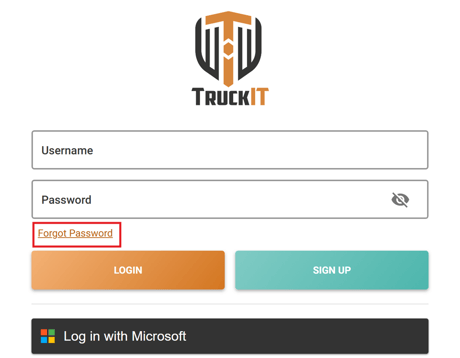
1. Click Forgot Password
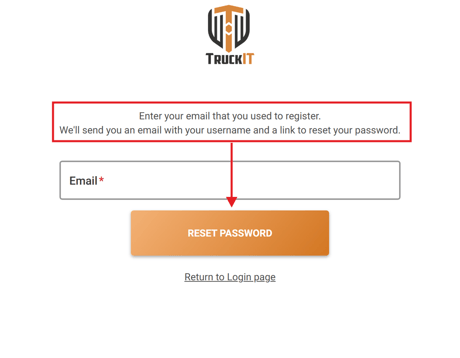
2. Enter your email and click Reset Password
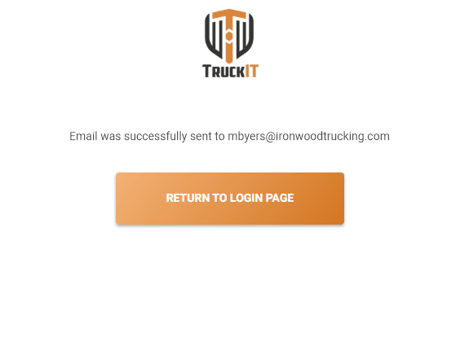
3. Check for the confirmation
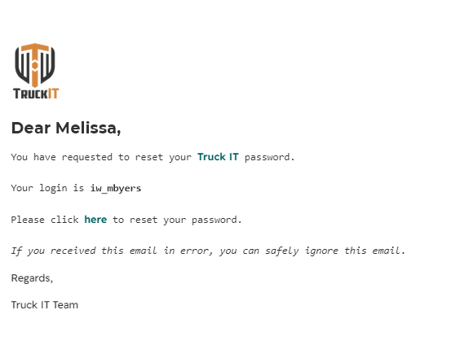
4. Open the email with your username and reset link
Cleaner Debtor Mapping ★ Feature Flag
What it isIf you use factoring through TruckIT Payments, you map each of your customers to a debtor, the customer your factoring company collects payment from. Archived restricted customers no longer appear in that mapping list.
Why you’ll careYou only see the customers you still work with, so setting up factoring is faster and invoices are less likely to be mapped to the wrong debtor.
Fuel Surcharge & Fees on Factoring Invoices ★ Feature Flag
What it isFactoring invoices in TruckIT Payments now include fuel surcharge and invoice fees, and those amounts carry over to the matching invoice in QuickBooks.
Why you’ll careYour factored invoices show the full amount you’re billing, and your QuickBooks records match what’s in TruckIT without adding fees by hand.
★ Feature flag: Factoring in TruckIT Payments is opt-in and not enabled by default. Contact TruckIT support to have it turned on for your account.
Suggested action: If you use factoring, review your debtor mapping in Payments now that archived restricted customers are out of the way, and check that fuel surcharge and invoice fees appear on your next factoring invoice in QuickBooks.
Mobile App — What’s New
Biometric Login
What it isYou can now sign in to the TruckIT app with your phone’s fingerprint or face recognition instead of typing your password.
Why you’ll careDrivers and field staff get into the app faster, with no password to remember or type, and the account stays protected by the phone’s own security.
|
Go to Profile & Settings
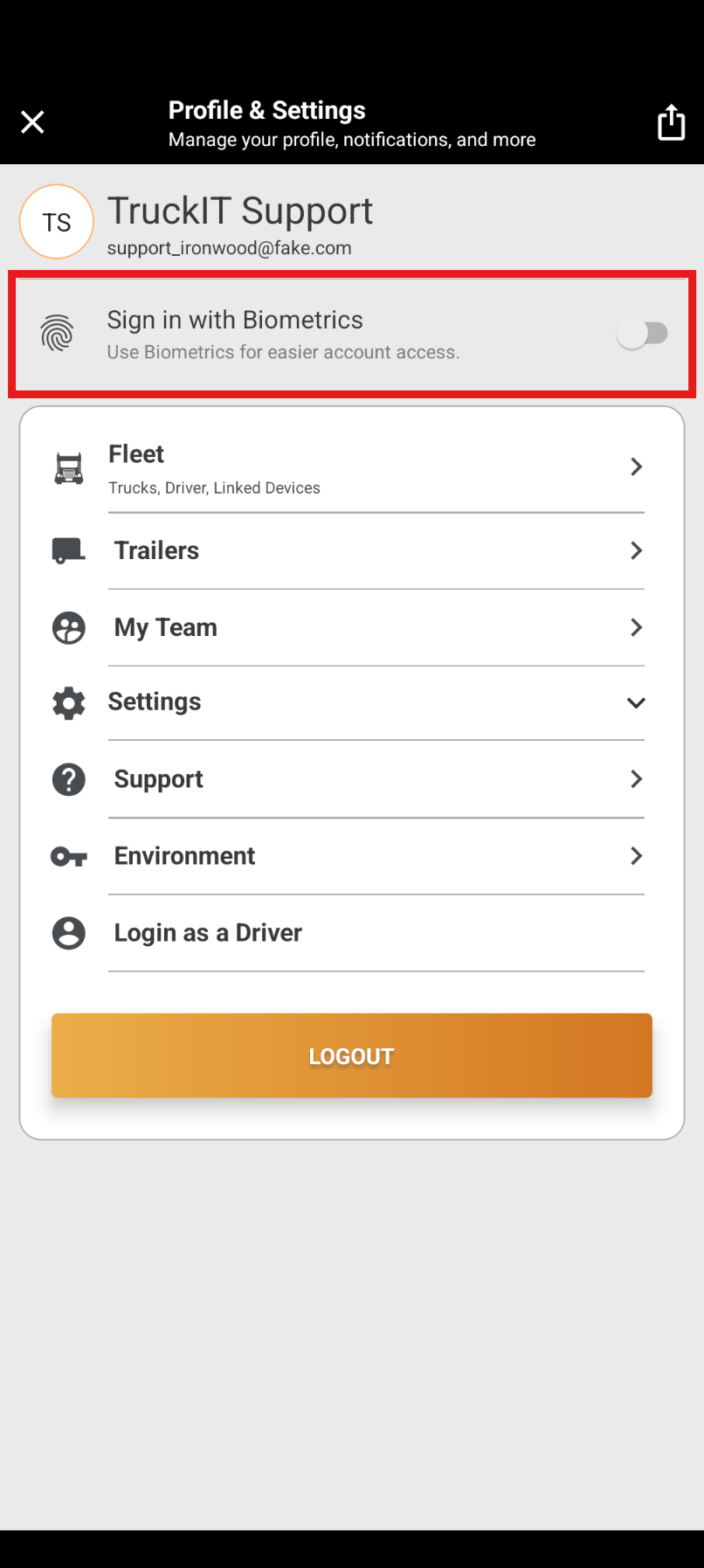
|
Turn on Sign in with Biometrics
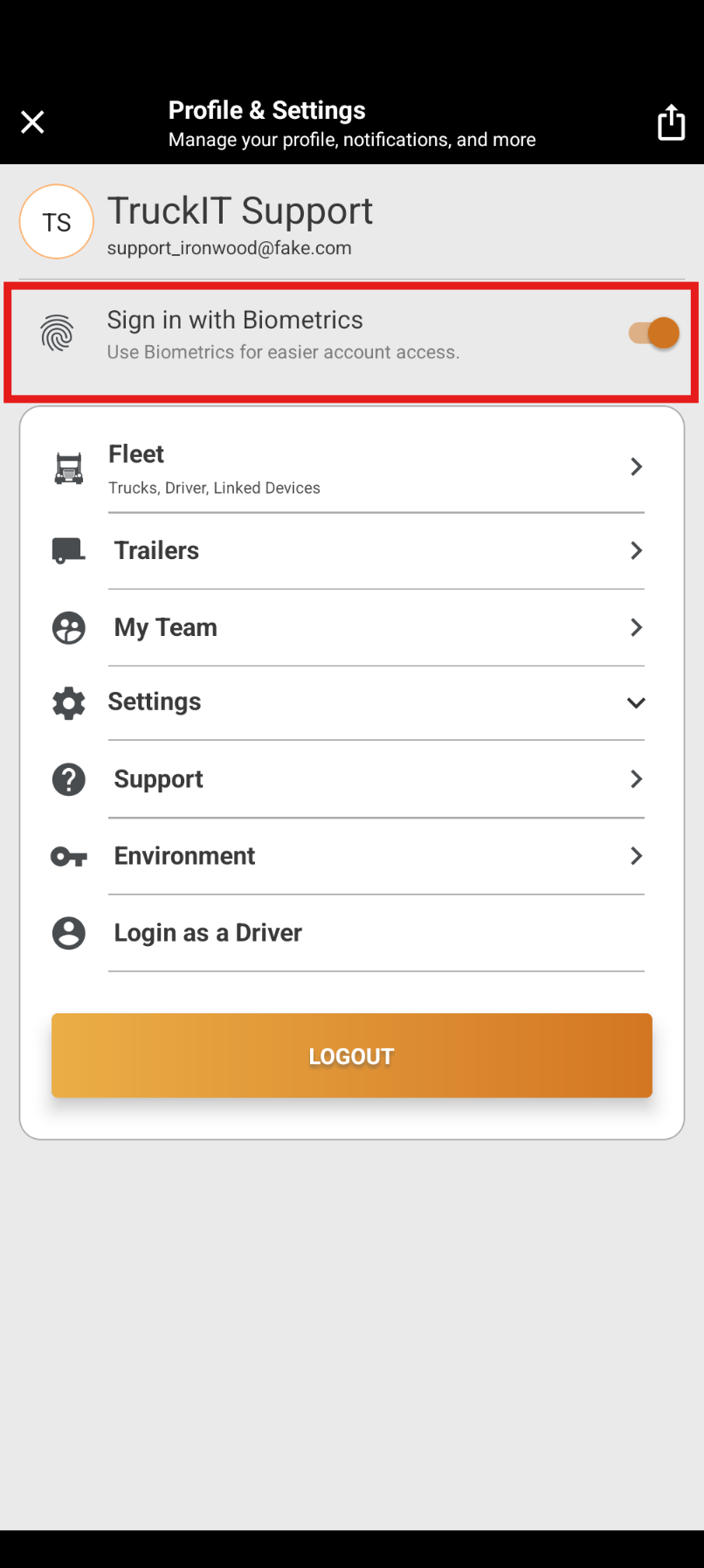
|
Job Map & Trucks for Customers
What it isCustomers you’ve given access to TruckIT (restricted and granted customers) can now see the job map and the trucks working their job in the mobile app.
Why you’ll careYour customers can check where their trucks are on their own, which means fewer “where’s my truck?” calls to your dispatchers.
Easier Password Reset
What it isThe improved password reset is in the app too: expired links are handled clearly and your username is filled in for you.
Why you’ll careDrivers who forget their password can get back in without calling the office.
Suggested action: Update to the latest version of the TruckIT app to start using biometric login and get this sprint’s offline-mode fixes.
Quality-of-Life Fixes
Finally Reconciled Tickets Stay Locked Web
Clicking View on a ticket marked Finally Reconciled no longer opens an editable reconcile menu, so finished tickets can’t be changed by mistake.
IoT Setting Saved on New Companies Web
When you create a company and leave the Samsara field empty, its IoT device setting is now saved correctly.
TicPic Report Filters Fixed Web
The ATP and Factored filters now work on the TicPic Report.
Correct Unit on Sub-Tickets Web
The sub-ticket creation form now shows the right unit of measure (for example, tons) instead of always showing hours.
Offline Crash on Android Fixed Mob
The Android app no longer crashes when you open a job while working offline.
Offline TicPics on Per-Day Tickets Mob
TicPics taken offline on per-day tickets are no longer missing once you’re back online.
Delivery Orders Available Offline Mob
You can once again make a delivery order available offline before heading into areas with poor signal.
What you might want to do
Tell your drivers about biometric login: Once they update the app, they can sign in with a fingerprint or face scan.
Let your customers know they can track trucks: Restricted and granted customers can now see the job map and trucks in the mobile app.
Interested in factoring? Contact TruckIT support to have factoring in Payments turned on for your account.
Revisit your TicPic Report: If you gave up on the ATP or Factored filters, try them again.
Update your mobile app: Get the latest version for biometric login and this sprint’s offline-mode fixes.
 Questions? support@truckit.com