Skip to content
English
  • There are no suggestions because the search field is empty.

What’s New This Sprint | May 5th, 2026

Here’s the May 5th (2026) edition of TruckIT's sprint newsletter and a quick look at the latest updates

Summary

From smarter integrations and easier ticket editing in the TruckIT web portal to improved mobile features, such as the standardized phone numbers and the enhanced signature capture, these enhancements help your team work faster and with fewer errors. You’ll also notice quality‑of‑life fixes across both web and mobile that improve consistency, stability, and clarity. Try out the new options in your portal and mobile app today to experience the improvements firsthand

These updates are LIVE now in the TruckIT Portal and Mobile Apps.

New in the Web Portal:

  • Improved UKG Integration

  • Edit option for Auto Closed tickets

  • Prevent duplicate Custom Field names

  • Block “Prohibit exceeding trucks number” toggle on closed jobs

New in Mobile:

  • Edit Auto Closed tickets and TicPics

  • Validate and standardize phone numbers

Fixes & Improvements:

  • Region no longer removed from Project while editing (Web Portal)

  • Payloads now archived at 23:59 by Time Zone (Web Portal)

  • Improved handling of Material Totals without rates (Web Portal)

  • Correct truck Start Time on the Job Board (Web Portal)

  • Settings stability after updates (Web Portal)

  • Drivers now see all linked tickets (Mobile App)

  • Signature capture on ticket (iOS only - Mobile App)

  • Duplicate notifications (Android only - Mobile App)

  • Site addresses display (Mobile App)

What’s New

Dispatch & TruckIT Portal

  • Improved UKG Integration
    What it is: Previously, when UKG triggered a create action, our pipeline skipped these users because they were already present, which caused issues like missing start times.
    Why you’ll care: This update ensures smoother synchronization between TruckIT and UKG. Existing users will now be processed correctly, preventing gaps in driver data (like start times) and reducing manual fixes.

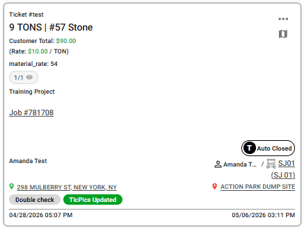
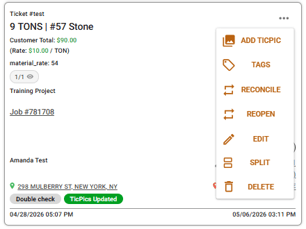
  • Edit option for Auto Closed tickets
    What it is: Drivers and dispatchers who already have access to a ticket can now edit Auto Closed tickets directly in the web portal. The “edit” button has been added under ticket actions.
    Why you’ll care: It streamlines workflows by letting the right people make necessary updates without reopening tickets.

    autoclosed1autoclosed2

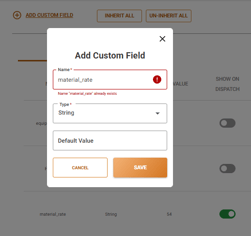
  • Prevent duplicate Custom Field names
    What it is: When creating a new CF, the system will now check for existing names that differ only by letter capitalization. If a similar name already exists, TruckIT will alert the user upon clicking “Save” and prompt them to choose a different name.
    Why you’ll care: This prevents confusion caused by multiple CFs with nearly identical names, ensuring cleaner data, easier navigation, and more reliable reporting.

    custom fields

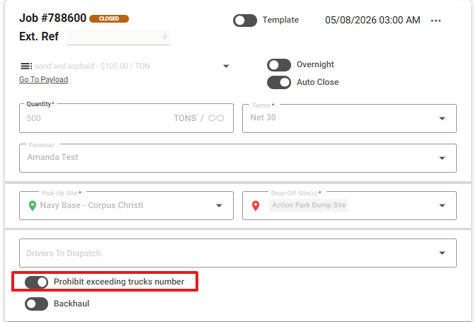
  • Block “Prohibit exceeding trucks number” toggle on closed jobs
    What it is: Previously, this toggle remained editable even though all other fields were locked. We’ve aligned permissions so that the toggle is now non-editable when a job is closed.
    Why you’ll care: This ensures closed jobs are fully protected from changes, keeping records consistent and preventing accidental modifications after closure.


    toggle-prohibited


Suggested action:
Try out the latest enhancements in the portal for smoother workflows and better data consistency. If something doesn’t behave as expected, perform a hard refresh of your browser (Ctrl + R or Cmd + Shift + R) and clear your cache to ensure all improvements load correctly.

Mobile Apps (Driver, Contractor, Inspector)

  • Edit Auto Closed tickets and TicPics
    What it is: Drivers and dispatchers can now edit Auto Closed tickets and TicPics from the mobile app.
    Why you’ll care: It gives your team more flexibility on the go, and ensures both tickets and TicPics stay accurate without extra steps.

  • Validate and standardize phone numbers
    What it is: We’ve implemented a validation step to prevent users from saving invalid phone numbers when creating or editing PoCs. Additionally, phone numbers are now standardized to include the “+” symbol for foreman and regular customer contacts (Restricted Customers and Grant Access Customers are excluded).
    Why you’ll care: It reduces errors, enforces proper phone number formats, and makes contact information more reliable and easier to use for drivers.

Suggested action: Update your team’s mobile app to ensure everyone has access to these improvements, then share the changes with your field team.

Quality-of-Life Fixes

  • Region no longer removed from Project while editing (Web Portal)
    We corrected an issue where the assigned region on a project was unintentionally cleared whenever a customer, terms, or pavertracker were added or updated.

  • Payloads now archived at 23:59 by Time Zone (Web Portal)
    We corrected an issue where payloads were being archived at 11:00 AM instead of the intended 23:59. Now, all the payloads with the auto close toggle enabled are properly archived at 23:59 for each company, taking their local time zone into account.

  • Improved handling of Material Totals without rates (Web Portal)
    We refined how material totals are displayed at the project level to ensure accuracy and consistency with payload data. Now, whenever at least one payload includes a material total, the project will display a project‑level total. Even if rates are later removed, the system continues to show the aggregated total provided by the API, ensuring project totals remain reliable and aligned with source data.

  • Correct truck Start Time on the Job Board (Web Portal)
    We resolved an issue where the Job Board page displayed the hauler start time instead of the actual truck start time. 

  • Settings stability after updates (Web Portal)
    We resolved an issue where navigating to the Settings page could cause a crash after a new version of the app was deployed. Now, when users open Settings, the page automatically reloads to ensure smooth and stable performance.

  • Drivers now see all linked tickets (Mobile App)
    Not all tickets were returned to drivers in the Mobile App after an ATL ticket was linked to a job. With this new fix, drivers will consistently see all their past tickets, ensuring accurate records and reducing confusion.

  • Signature capture on ticket (iOS only - Mobile App)
    The signature capture form was unstable and moved while the customer was writing, preventing the signature from being saved. Drivers and customers can now smoothly capture and save signatures on iOS devices, ensuring tickets requiring signatures are completed without interruptions. 

  • Duplicate notifications (Android only - Mobile App)
    We resolved an issue where dispatchers from a subhauler account, when logged in as a driver on the Android Mobile App, were receiving duplicate notifications. These included alerts about truck assignments and closed jobs.

  • Site addresses display (Mobile App)
    We resolved an issue where site addresses were cropped on the mobile app under the Projects → Sites tab. Addresses are now properly wrapped, making them fully visible and easier to read when accessing site details on mobile.

What you might want to do

  • Review: 
    Take a look at each enhancement done on the Web Portal and the Mobile App. They are designed and implemented to streamline workflows, reduce errors, and improve visibility. See which changes can immediately boost your team’s daily efficiency. Small improvements, big impact.

  • Update Mobile App:
    Ensure your team is using the latest version to access new tools and updates.

  • Recommendation: 
    Share this information with dispatchers, drivers, and contractors, so all roles are aware of the improvements. Keeping everyone aligned will help your organization fully benefit from the enhanced clarity, consistency, and reliability across the platform.

Help & Support