Skip to content
English
  • There are no suggestions because the search field is empty.

What’s New This Sprint | June 2nd, 2026

Here’s the June 2nd (2026) edition of TruckIT's sprint newsletter and a quick look at the latest updates


Summary

From a new share TicPic report feature to expanded subhauler capabilities and improved load management, this sprint brings meaningful additions across the TruckIT web portal and mobile app. You'll also find several targeted quality-of-life fixes that resolve ticket, project, and reporting inconsistencies to keep your workflows running smoothly.

These updates are LIVE now in the TruckIT Portal and Mobile Apps.

TL;DR

New in the Web Portal:

  • Email TicPic — share directly from TruckIT
  • Subhaulers can save jobs as draft
  • Custom Fields now visible and editable for subhaulers on the job form
  • Manually add loads to tickets and during Bulk Reconcile
  • Project totals now include both archived and active payloads
  • Unit of Measure displayed per rate in the ticket edit form


New in Mobile:

  • Edit loads on closed tickets
  • Load Counts Protected on Driver Tickets

Quality-of-Life Fixes:

  • Subhaulers can now edit Custom Fields (Web Portal)
  • Terms now save when dispatching a job without a truck (Web Portal)
  • Canceling a pick-up no longer deletes the ticket on Hourly Per Day jobs (Web Portal)
  • Project totals correctly reflect archived vs. active payloads (Web Portal)
  • Efficiency Report now accounts for Material Unit of Measure (Web Portal)
  • Foreman name preserved when updating Customer (Web Portal)
  • Payments "Select All" now works correctly (Web Portal - related to a feature)
  • IoT details page no longer crashes (Web Portal - related to an Integration)
  • Invalid date display for Offline Hauler start time resolved (Mobile App)
  • App no longer crashes when navigating to settings for permissions (Mobile App)

What’s New

Dispatch & Web App

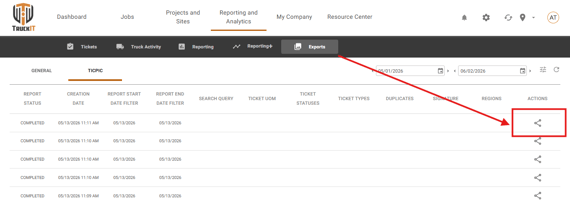
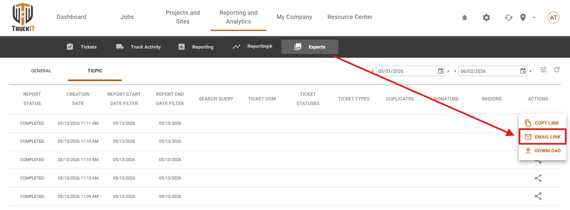
  • Email TicPic — share directly from TruckIT
    What it is: You can now email TicPic reports directly from TruckIT, making it easier to share ticket photos with customers, partners, or your team.
    Why you'll care: No more downloading and re-uploading pictures — send TicPics straight from the portal in just a few clicks, saving time and reducing manual steps.

    share-ticpic-report1

    share-ticpic-report2

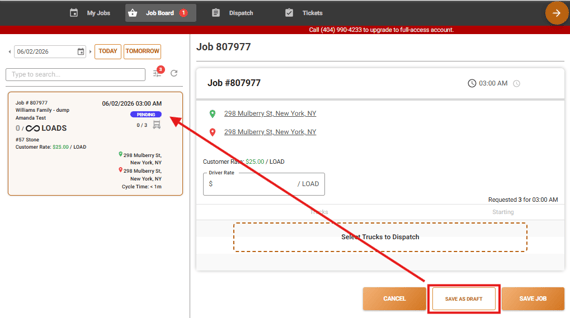
  • Subhaulers Can Save Jobs as Draft
    What it is: Subhaulers can now save jobs as drafts before finalizing and dispatching them.
    Why you'll care: This gives sub-haulers more flexibility to prepare jobs ahead of time without committing to a final dispatch, reducing rushed or incomplete job creation.

    save-draft-subhauler

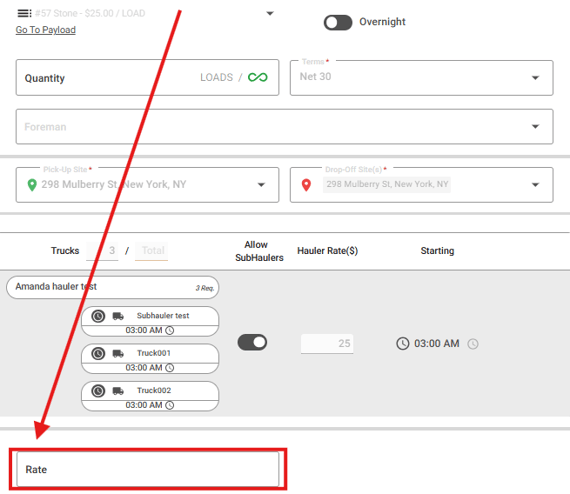
  • Custom Fields on the Job Form for Subhaulers
    What it is: Subhaulers can now view and interact with Custom Fields directly on the job form, in addition to being able to edit them on tickets.
    Why you'll care: This ensures subhaulers have the full context they need when working with jobs that require additional data, reducing back-and-forth communication and preventing missing information.

     Subhaulers-custom-fields 

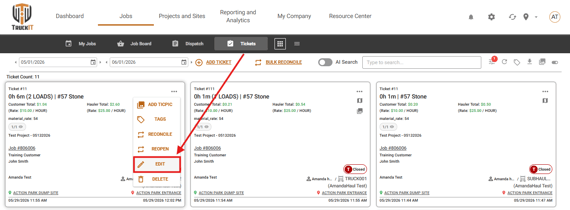
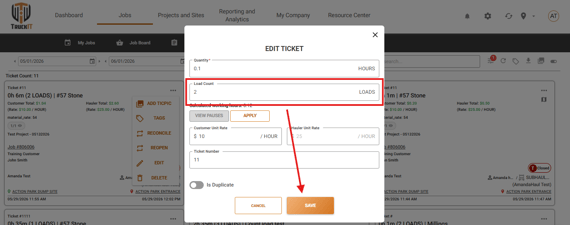
  • Manually Add Loads to Tickets & Bulk Reconcile
    What it is: Dispatchers can now manually add loads to tickets, including during the Bulk Reconcile process.
    Why you’ll care: This provides greater control over ticket accuracy — especially useful when loads need to be added after the fact or corrected at the time of reconciliation.

    edit-loads

    edit-loads2

  • Project Totals: Archived & Active Payloads
    What it is: Project totals now include both archived and active payloads, giving you a complete financial summary of the project regardless of payload status.
    Why you'll care: Previously, archived payloads could affect the accuracy of project level totals. Now the numbers are comprehensive and reliable, so you can trust the figures shown at the project level.

  • Unit of Measure Shown Per Rate in Ticket Edit Form
    What it is: When editing a ticket, the UoM is now displayed alongside each rate entry.
    Why you'll care: It makes it easier to verify ticket accuracy and reduces confusion when multiple rate types or units are in use on the same ticket.

Suggested action: Try out the latest enhancements in the portal for smoother workflows and better data consistency. If something doesn’t behave as expected, perform a hard refresh of your browser (Ctrl + R or Cmd + Shift + R) and clear your cache to ensure all improvements load correctly.


Mobile Apps (Driver, Contractor, Inspector)

  • Edit Loads on Closed Tickets
    What it is: Drivers can now edit loads directly from closed tickets in the mobile app.
    Why you'll care: This eliminates the need to contact a dispatcher or take additional steps just to correct load information after a ticket has been closed, keeping records accurate without disrupting workflows.

  • Load Counts Protected on Driver Tickets
    What it is: Drivers are prevented from editing load counts on certain ticket types, with the field disabled and clear messaging provided.
    Why you'll care: This improvement makes the process clearer and prevents accidental changes, keeping load records accurate.


Suggested action: Update your team’s mobile app to ensure everyone has access to these improvements, then share the changes with your field team.

Quality-of-Life Fixes (plain English)

  • Subhaulers can now edit Custom Fields (Web Portal)
    An issue was preventing sub-haulers from editing Custom Fields on tickets, even when they had the appropriate access. This has been resolved — sub-haulers can now update Custom Fields as expected.

  • Terms now save when dispatching without a truck (Web Portal)
    Term selections were not being saved when dispatching a job that didn't have a truck assigned. This issue is now resolved, and terms will be displayed correctly regardless of whether a truck is included in the dispatch.

  • Canceling a pick-up no longer deletes the ticket on Hourly Per Day jobs (Web Portal)
    When a pick-up was canceled on an Hourly Per Day job, the associated ticket was being unintentionally deleted. Now, by canceling a pick-up, the driver only removes the pick-up action, leaving the ticket intact.

  • Project totals correctly reflect archived and active payloads (Web Portal)
    The project-level total was not properly distinguishing between archived and active payloads, which could lead to inaccurate figures. This is now fixed, and totals reflect the correct breakdown.

  • Efficiency Report now accounts for Material Unit of Measure (Web Portal)
    The Efficiency Report was not taking the Material Unit of Measure into account when calculating totals. This has been corrected to ensure accurate and complete reporting.

  • Foreman name preserved when updating Customer (Web Portal)
    Previously, updating a regular customer or a restricted customer on a project would unintentionally remove the foreman's name. This has been resolved — the foreman's name is now retained through those edits.

  • Payments "Select All" now works correctly (Web Portal - related to a feature)
    There was an error with the "Select All" checkbox behavior in the Payments section. This has been fixed so that selections behave as expected when managing payments.

  • IoT details page no longer crashes (Web Portal - related to an integration)
    Viewing IoT details was causing the page to crash. This has been resolved, and the IoT details page now loads correctly.

  • Invalid date display for Offline Hauler start time resolved (Mobile App)
    When copying or editing a job, the Offline Hauler's truck start time was displaying as "Invalid date." This has been corrected, and the accurate start time now appears as expected.

  • App no longer crashes when navigating to settings for permissions (Mobile App)
    The app was crashing when users navigated to the Settings page to grant device permissions. This is now resolved for a smoother experience.

What you might want to do

  • Review: 
    Take a look at each enhancement done on the Web Portal and the Mobile App. They are designed and implemented to streamline workflows, reduce errors, and improve visibility. See which changes can immediately boost your team’s daily efficiency. Small improvements, big impact.

  • Update Mobile App:
    Ensure your team is using the latest version to access new tools and updates.

  • Recommendation: 
    Share this information with dispatchers, drivers, and contractors, so all roles are aware of the improvements. Keeping everyone aligned will help your organization fully benefit from the enhanced clarity, consistency, and reliability across the platform.

Help & Support