Skip to content
English
  • There are no suggestions because the search field is empty.

What’s New This Sprint | June 17th, 2026

Here’s the June 2nd (2026) edition of TruckIT's sprint newsletter and a quick look at the latest updates


Summary

This sprint brings a significant expansion to how regions work across TruckIT — you can now archive regions, filter by unassigned region, and see region information directly on jobs, the dashboard, and the live map. Alongside that, we've added FactorCloud payment integration, the ability to print digital tickets, and a suite of quality-of-life improvements across both the web portal and mobile app that reduce errors and improve data accuracy.

These updates are LIVE now in the TruckIT Portal and Mobile Apps.

TL;DR

New in the Web Portal:

  • Regions: Archive, Filter, and Expanded Visibility
  • FactorCloud payment integration now available
  • Print digital tickets directly from the web portal
  • PDF TicPic and CSV ticket report order now consistent
  • Job Board: Close Button Hidden for Job Owners
  • Tooltips for Customer and Foreman Long Names
  • Subhauler Date Pickers Blocked for Job Owners
  • Custom Fields: Duplicate Name Check on Unarchive

New in Mobile:

  • Filter by No Region Assigned
  • Archived regions are now hidden when selecting a region

Quality-of-Life Fixes:

  • Qty Delivered now accurate per truck (Web Portal + Mobile)
  • Soft-deleted Custom Fields no longer appear on tickets or objects (Web Portal)
  • Parent ticket now viewable after subticket rejection (Web Portal)
  • Price per Unit now shown when Customer Rate is $0 (Web Portal)
  • Ticket list now waits until fully loaded before appearing (Web Portal)
  • Ticket filters now persist after a page refresh (Web Portal)
  • Region search in Projects now returns results correctly (Web Portal)
  • Region filter applies correctly on first navigation to Tickets (Web Portal)

What's New

Dispatch & Web App

  • Regions: Archive, Filter, and Expanded Visibility
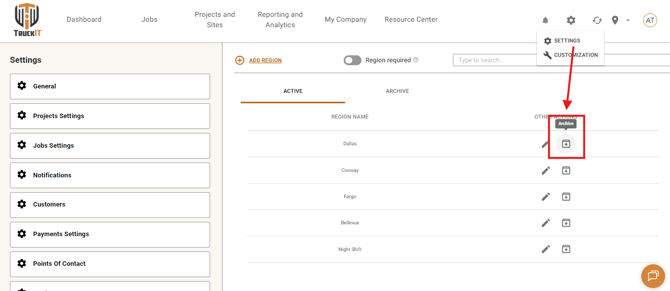
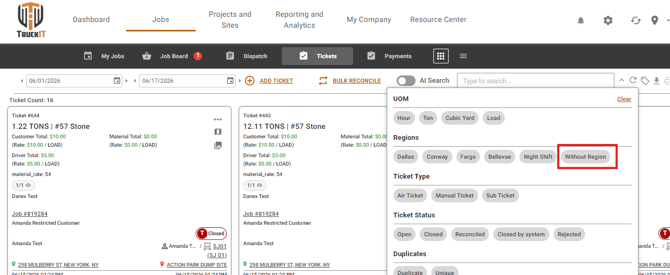
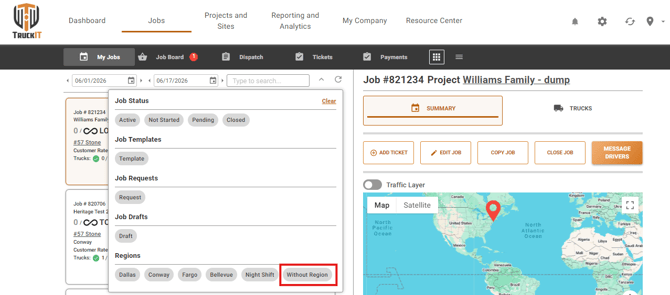
    What it is: Regions have received a major set of enhancements this sprint. You can now archive regions you no longer need, keeping your region list clean and focused without permanently deleting anything. A new "no region" filter lets you quickly find jobs, tickets, or trucks that haven't been assigned to a region. Region information is now also displayed on the job detail page, in the trucks table on the Dashboard, and on the Live Map, so you always know which region a job or truck belongs to.
    Why you'll care: These changes give your team much greater visibility and control over how work is organized by region. Whether you're cleaning up old regions, tracking down unassigned jobs, or reviewing activity by region across your dashboard and live map, everything is now in one place and easy to find.

    archive-regions

    without-region-tickets

    without-region-filter
  • FactorCloud Payment Integration
    What it is: TruckIT now supports mapping your account to a FactorCloud account for payment processing. This enables a direct connection between TruckIT job data and FactorCloud's payment workflow.
    Why you'll care: If your organization uses FactorCloud for payments, this integration reduces manual steps and makes it easier to reconcile jobs and payments across both platforms.

  • Print Digital Tickets
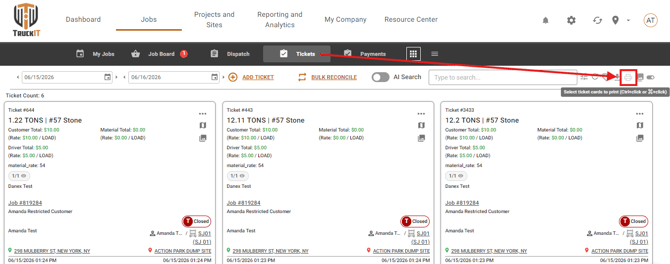
    What it is: You can now print digital tickets directly from the TruckIT web portal.
    Why you'll care: This gives your team a quick way to produce a physical or printable record of a digital ticket without extra steps, useful for field documentation, compliance, or customer sign-off.

    print-tickets 
  • PDF TicPic and CSV Ticket Report Order Now Consistent
    What it is: The order in which tickets appear in exported PDF TicPic reports and CSV ticket reports now matches consistently.
    Why you'll care: When reviewing or sharing exported reports, tickets will appear in the same order regardless of which format you export, making comparisons and audits easier.

  • Job Board: Close Button Hidden for Job Owners
    What it is: The Close button no longer appears on your own job board items when you are the job owner.
    Why you'll care: This removes a potential source of accidental closures, giving you cleaner and safer job management from the Job Board view.

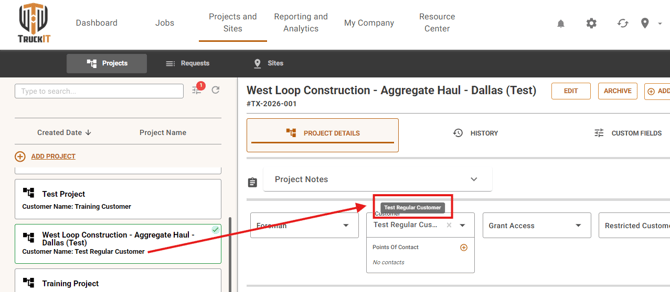
  • Tooltips for Customer and Foreman Long Names
    What it is: When a customer or foreman name is too long to display in full on a project, hovering over the name now shows the complete name in a tooltip.
    Why you'll care: No more guessing or navigating away just to see a full name — the information you need is right there on hover, keeping your workflow fast.

    tooltip-customer
  • Subhauler Date Pickers Blocked for Job Owners
    What it is: As a job owner viewing the Dispatch screen, you can no longer accidentally change the date pickers for subhauler trucks.
    Why you'll care: This prevents unintended edits to subhauler schedules, keeping dispatch information accurate and reducing confusion between owners and subaulers.

  • Custom Fields: Duplicate Name Check on Unarchive
    What it is: When unarchiving a Custom Field, TruckIT now checks whether a field with the same or similar name already exists. If a conflict is found, you'll be alerted before the unarchive is completed.
    Why you'll care: This prevents duplicate Custom Field names from slipping back into your setup through the unarchive path, keeping your data clean and your field list easy to navigate.

Suggested action: Try out the latest enhancements in the portal for smoother workflows and better data consistency. If something doesn’t behave as expected, perform a hard refresh of your browser (Ctrl + R or Cmd + Shift + R) and clear your cache to ensure all improvements load correctly.


Mobile Apps (Driver, Contractor, Inspector)

  • Filter by No Region Assigned
    What it is: Drivers and contractors can now filter jobs and tickets by "no region" — surfacing only those that haven't been assigned to a region yet.
    Why you'll care: This makes it easy to spot and act on jobs or tickets that may have been missed in your region organization, without scrolling through everything manually.

  • Archived regions are now hidden when selecting a region
    What it is: When choosing a region on mobile, archived regions are no longer included in the selection list.
    Why you'll care: Your region list stays clean and relevant — no more sorting through outdated options to find the one you need.

Suggested action: Update your team’s mobile app to ensure everyone has access to these improvements, then share the changes with your field team.

Quality-of-Life Fixes (plain English)

  • Qty Delivered now accurate per truck (Web Portal + Mobile)
    The "Qty Delivered" figure shown per truck was incorrectly displaying the total quantity for the entire job, rather than that individual truck's contribution. This has been corrected — the quantity shown per truck now reflects only that truck's delivered amount.

  • Soft-deleted Custom Fields no longer appear on tickets (Web Portal)
    Custom Fields that had been deleted were still showing up when viewing tickets and other records. This has been resolved — only active Custom Fields will now appear.

  • Parent ticket now viewable after subticket rejection (Web Portal)
    When a subticket was rejected, it was no longer possible to open and view the associated parent ticket. This has been fixed — parent tickets are accessible regardless of the subticket's status.

  • Price per Unit now shown when Customer Rate is $0 (Web Portal)
    The Price per Unit field was being hidden on tickets whenever the Customer Rate was set to zero. It now displays correctly in all cases, including when the rate is $0.

  • Ticket list now waits until fully loaded before appearing (Web Portal)
    The loading indicator on the Tickets page was disappearing before all tickets had finished loading, which could make the list appear empty or incomplete. Tickets now load fully before being displayed.

  • Ticket filters persist after page refresh (Web Portal)
    Filters applied on the Tickets page were being cleared whenever the page was refreshed. Filters now stay in place after a refresh, so you don't have to reapply them each time.

  • Region search in Projects now returns results correctly (Web Portal)
    Searching by region within the Projects section was not returning any results. This has been corrected — region search now works as expected.

  • Region filter applies correctly on first navigation to Tickets (Web Portal)
    Users whose account is tied to a specific region were not seeing that region's filter automatically applied when they first opened the Tickets page. This now applies correctly on the initial page load.

What you might want to do

  • Review: 
    Take a look at the Regions enhancements in both the Web Portal and Mobile App — they represent a significant step forward in how your team can organize and track work across locations. The new filters, visibility improvements, and archiving capability are designed to reduce manual effort and keep your data clean.

  • Update Mobile App:
    Ensure your team is using the latest version to access the new region filter, the cleaner region selection list, and the Qty Delivered fix.

  • Recommendation: 
    Share this information with dispatchers, drivers, and contractors so all roles are aware of the improvements. Keeping everyone aligned will help your organization fully benefit from the enhanced clarity, consistency, and reliability across the platform.

Help & Support