
Live Now
TruckIT · Product Update

TL;DR
What’s New
– Multiple regions per project Web
– Message customers upon delivery of material Web
– New UoMs — Cubic Yards combination Web Mob ★ feature flag
– New UoMs — SubTicket rate editing Web ★ feature flag
– Hauler Unit Rate hidden on Free ticket edition Web
– Edit Profile button hidden for Default Manager Web
– Link Lite to job — clear truck limit error message Web
– Regions on the job — visibility, saved filter, change alerts Mob
Quality-of-Life Fixes
– Duplicate payload rates removed Web
– Assign Drivers — driver/truck load mixup fixed Web
– Inspector — Actions button & date-reset fixed Web
– Payloads — external-project dates fixed Web
– Forgot-password UI copy typo fixed Web
– Date-comparison error fixed Web
– Template job copy — job order settings fixed Web
– Faster app startup on Android Mob
– Settings pop-ups fixed (open/cancel) Mob
– Send Photo error fixed Mob
– Offline flow — sub-ticket closes correctly now Mob
– Generic app error fixed Mob
– Complete Drop Off — wrong-zone error fixed Mob
– DO Dump — now uses Trailer capacity Mob
– Dispatch — quantity fixed by job type Mob
Web Portal — What’s New
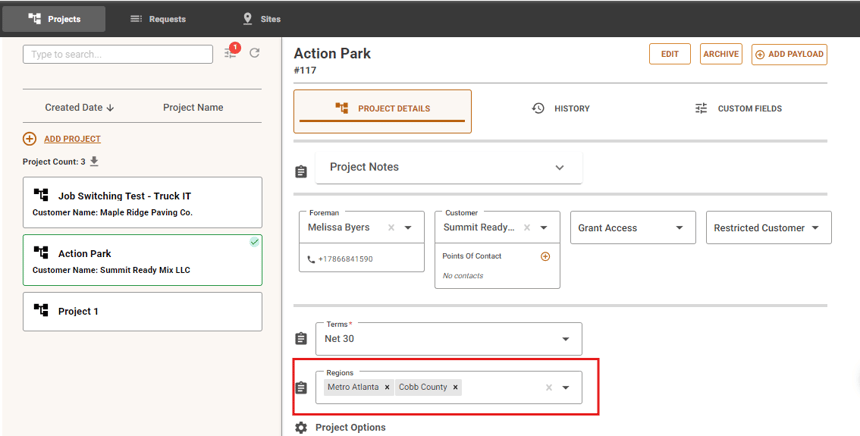
Multiple Regions per Project
What it isYou can now assign more than one region to a single project instead of being limited to one.
Why you’ll careModel regional operations the way they actually work when a project spans more than one region — no more workarounds or duplicate projects.
Message Customers Upon Delivery of Material
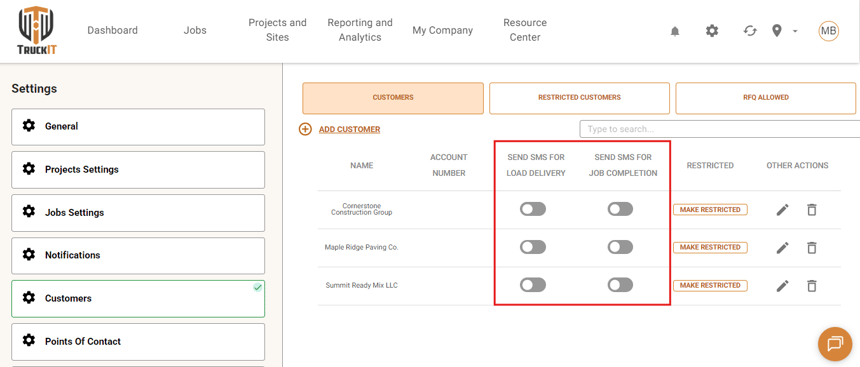
What it isA new option lets you automatically message customers when their material is delivered.
Why you’ll careKeep customers in the loop without manual calls or texts every time a load lands.
New UoMs — Cubic Yards Combination ★ Feature Flag
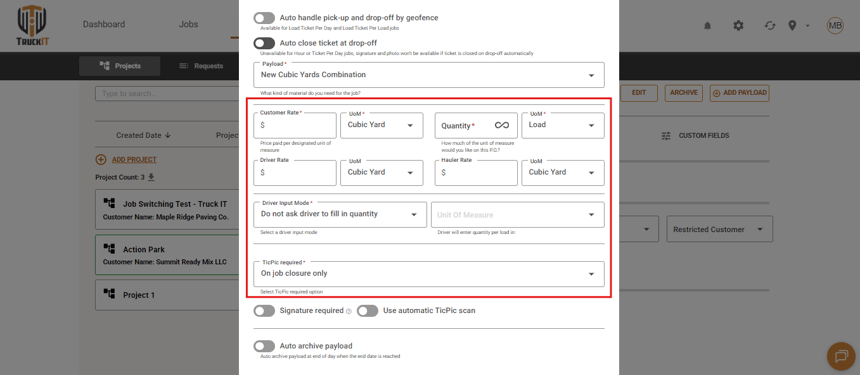
What it isA new Cubic Yards unit-of-measure combination for load-based jobs. Instead of generating a ticket per load, the job produces one ticket per day — quantity autofills from truck capacity on each load, a load counter tracks how many loads were run, and the rate is calculated in Cubic Yards. Because it’s one ticket per day rather than per load, the TicPic is only captured once, at ticket closure. Payload rates originally set up in Tons can also be switched to Cubics.
Why you’ll careAccurate Cubic Yards rates on load-based jobs with a lot less manual work, no more snapping a TicPic on every single load — just one per day, at closure.
New UoMs — SubTicket Rate Editing ★ Feature Flag
What it isRates can now be edited directly on SubTickets under the New UoMs setup (Cubic Yards).
Why you’ll careCorrect pricing on a SubTicket without deleting and recreating it.
★ Feature flag: New UoMs is opt-in and not enabled by default — it covers both the Cubic Yards combination and SubTicket rate editing above. Contact TruckIT support to have it turned on for your account.
Hauler Unit Rate Hidden on Free Ticket Edition
What it isThe Hauler Unit Rate field is no longer shown on the Free ticket edition.
Why you’ll careTicket editing stays focused on the fields that actually apply to your plan — no confusing rate field that doesn’t apply.
Edit Profile Button Hidden for Default Manager
What it isThe Edit Profile button is now hidden for the Default Manager on Offline Hauler accounts.
Why you’ll careThe profile screen only shows actions the Default Manager role can actually use.
Link Lite to Job — Clear Truck Limit Error Message
What it isWhen you link a Lite ticket that already has a truck assigned to a job, and that job has already reached its truck limit, the portal now shows one clear error — “Cannot link ticket: job truck limit is reached” — instead of an unclear or duplicated message.
Why you’ll careYou’ll know immediately and unambiguously why the link failed, with a single clear message instead of guessing.
Suggested action: Try the new features in the portal. If something looks off, do a hard refresh (Ctrl + R or Cmd + Shift + R) and clear your cache.
Mobile App — What’s New
New UoMs — Cubic Yards Combination ★ Feature Flag
What it isThe same new Cubic Yards UoM combination available on web, now on mobile — quantity fills in based on truck capacity for load tickets, with TicPic captured on ticket closure only.
Why you’ll careAccurate cubic-yard quantity capture from the field, matching the web experience.
★ Feature flag: New UoMs is opt-in and not enabled by default. Contact TruckIT support to have it turned on for your account.
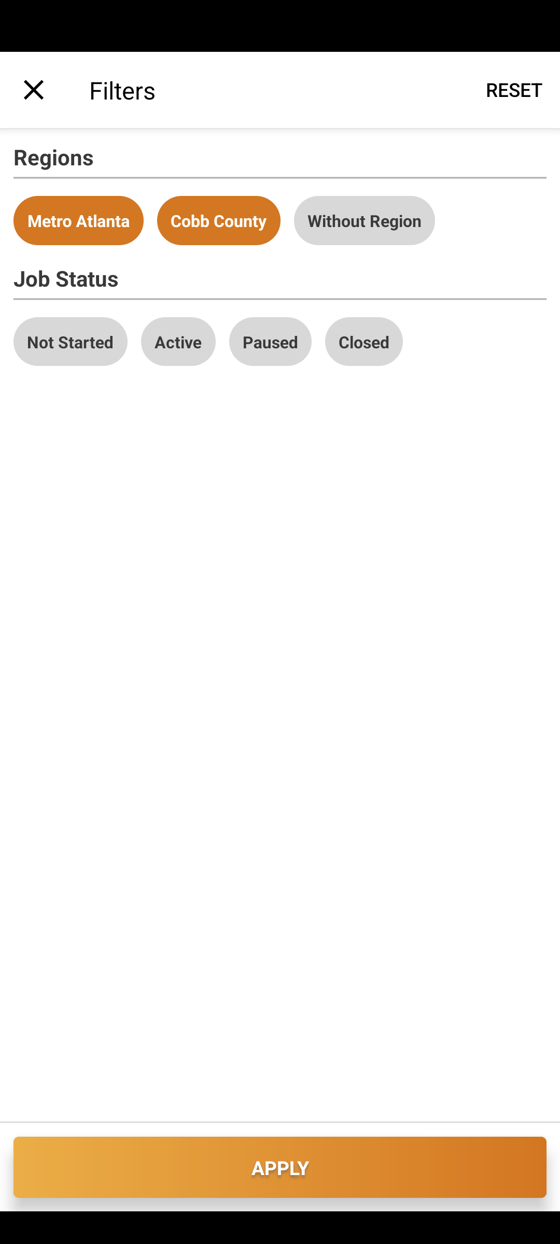
Regions on the Job — Visibility, Saved Filters & Change Alerts
What it isDrivers now see their assigned region right on the job, their region filter choice is remembered between sessions, and they get a push notification whenever their assigned region changes.
Why you’ll careLess digging to find the right region, and no surprises when a dispatcher reassigns you — you’ll know the moment it happens.
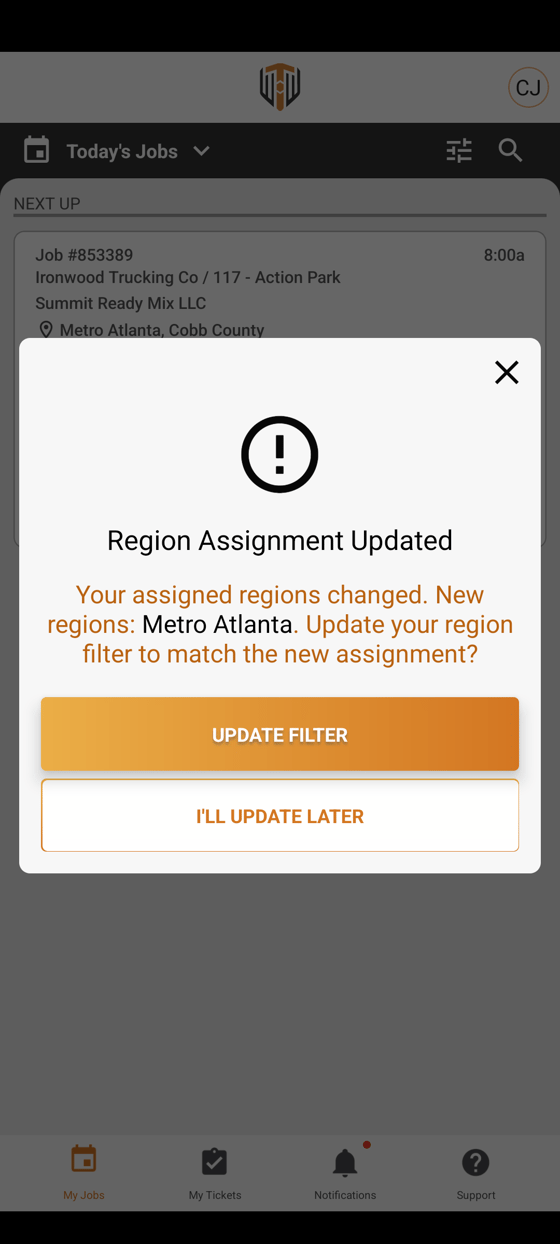
Suggested action: Update your mobile app to the latest version from the App Store or Google Play to get these changes.
Quality-of-Life Fixes
Duplicate Payload Rates Removed Web
Fixed duplicated rates (per-unit price, custom hauler rate, driver pricing rate) showing up on payload listings.
Assign Drivers — Driver Loads No Longer Summed with Truck Loads Web
Driver loads are no longer summed together with truck loads during quantity validation.
Inspector — Missing Actions Button & Date Reset Fixed Web
Fixed the Tickets Actions button not appearing, and the date resetting, when there are no tickets for the selected start date.
Payloads — External Project Dates No Longer Reset Web
Dates for external projects no longer reset to null after navigating away from and back to the Dispatch page.
Forgot Password Typo Fixed Web
Fixed a typo in the forgot-password UI copy on the portal.
Date Comparison Error Fixed Web
Fixed a “can’t compare offset-naive and offset-aware datetimes” error.
Template Job Copy No Longer Drops Job Order Settings Web
Copying a template job no longer drops its job order settings (currently fixed for photo-mode tickets).
Android App Startup Optimized for a Faster Launch Mob
Optimized app startup on Android for a faster launch.
Settings Pop-ups — Opening & Cancelling Fixed Mob
Fixed several Settings pop-ups that weren’t opening or couldn’t be cancelled.
Send Photo Error Fixed Mob
Fixed a “Cannot read property ‘items’ of null” error when sending a photo.
Offline Flow — Sub-ticket Now Closes Correctly Mob
Fixed the offline flow closing the parent ticket instead of the sub-ticket.
Generic App Error Fixed Mob
Fixed a “TypeError: undefined is not a function” error.
Complete Drop Off — Wrong-Zone Error Fixed Mob
Fixed a false “you cannot drop off because you are not in the right zone” error when completing a drop-off.
DO Dump — Weight Limit Now Uses Trailer Capacity Mob
Jobs with a DO Dump now correctly use Trailer capacity instead of Truck capacity for the weight limit.
Dispatch — Quantity Fixed for Weight/Volume/Hour Jobs Mob
Fixed quantity being sent per JOLI instead of correctly for weight/volume/hour jobs.
What you might want to do
Review: If your projects span more than one region, assign the additional regions now that a project supports more than one.
Enable New UoMs: If you want the new Cubic Yards UoM combination on web or mobile, contact TruckIT support to have the “New UoMs” flag turned on for your account.
Update Mobile App: Update to the latest version to get the Regions updates, faster Android startup, and this sprint’s fixes.
Set Up Delivery Messaging: Turn on the new “message customers on delivery” option if you’d like customers notified automatically when their material arrives.
 Questions? support@truckit.com