Skip to content
English
  • There are no suggestions because the search field is empty.

What’s New This Sprint | April 7th, 2026

Here’s the April 7th (2026) edition of TruckIT's sprint newsletter and a quick look at the latest updates


Summary

This release brings smoother planning, clearer visibility, and more flexibility across web and mobile. Dispatchers can now plan ahead with Draft Jobs, understand auto‑close impacts, and manage ticket photos more easily. Drivers gain more control with gallery TicPics and a more reliable My Fleet view. We’ve also rolled out several quality‑of‑life fixes to improve consistency, accuracy, and everyday workflows.

These updates are LIVE now in the TruckIT Portal and Mobile Apps.


New in the Web Portal:

  • Draft Jobs: plan first, dispatch when ready

  • Clear visibility when Auto‑Closing Tickets

  • TicPic downloads now use the Ticket Number

New in Mobile:

  • Add TicPics from the Photo Gallery

  • My Fleet view is accurate after a failed truck linking

Fixes & Improvements:

  • Consistent truck Start Times across Web and Mobile

  • Editing Custom Field names now supports capitalization changes

  • Fixed driver rates on tickets

  • Subhaulers can now set pricing for custom UoMs

  • An email is now required when editing team members


What’s New

Dispatch & TruckIT Portal

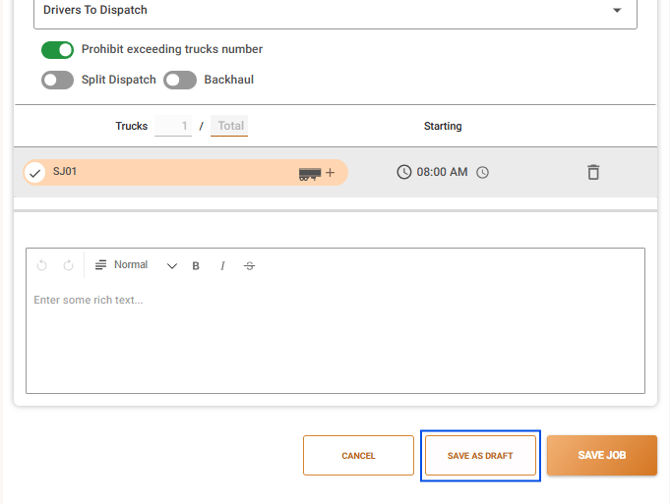
  • Draft Jobs: plan first, dispatch when ready
    What it is: Draft Jobs allows dispatchers to create and plan jobs without immediately sending them to drivers. You can assign trucks, make changes, and finalize details while keeping everything internal until the job is ready to be officially dispatched.
    Why you’ll care: This gives dispatchers flexibility to plan ahead, adjust assignments, and avoid premature notifications—making dispatch smoother and more accurate.

  • Clear visibility when Auto‑Closing Tickets
    What it is: We added clear messaging to show when signatures and photos won’t be available if a ticket is set to auto‑close at drop‑off or at the paver. This makes it obvious how auto‑close settings affect ticket details.
    Why you’ll care: Make informed choices when enabling auto‑close options, avoiding surprise gaps in signatures or photos, and setting the right expectations up front.

  • TicPic downloads now use the Ticket Number
    What it is: We improved how TicPic files are named when downloaded. Files now use the ticket number in their name whenever it’s available, making them easier to recognize and organize.
    Why you’ll care: This makes finding and matching photos to tickets faster and clearer, especially when downloading or sharing multiple TicPics at once.

Suggested action: Take a moment to explore and test the latest updates in the web portal. These improvements help you plan more confidently and manage tickets with better visibility. If anything appears out of date or doesn’t behave as expected, please perform a hard refresh of your browser (Ctrl + R or Cmd + Shift + R) and clear your browser cache. This ensures the newest features and fixes load correctly and helps resolve most display or usability issues.

Mobile Apps (Driver, Contractor, Inspector)

  • My Fleet view is accurate after a failed truck linking
    What it is: A driver’s own truck could appear incorrectly linked after a failed attempt to link to another truck. The list now refreshes properly and reflects the true truck status after an error.
    Why you’ll care: This prevents confusion after a blocked linking action and ensures drivers always see an accurate, up‑to‑date view of their truck assignments.

  • Add TicPics from the Photo Gallery
    What it is: Drivers can now attach a TicPic directly from their phone’s photo library, in addition to taking a new photo. The option appears while trying to submit the TicPic, they can either take a picture or attach it by tapping on the “Photo Library” button.
    Why you’ll care: This gives drivers more flexibility in the field, saving time and ensuring tickets include the best available photos.


Suggested action: Update your team’s mobile app to ensure everyone has access to these improvements, then share the changes with your field team.

Quality-of-Life Fixes

  • Consistent truck Start Times across Web and Mobile
    We resolved an issue where truck start times could appear on the wrong day between the web platform and the mobile app. Jobs now show up reliably at the correct date and time, no matter where they’re viewed.

  • Editing Custom Field names now supports capitalization changes
    We fixed an issue where editing a custom field name failed if the only change was capitalization. You can now update a field’s name to adjust letter case without running into an error.

  • Fixed driver rates on tickets
    We fixed an issue where removing the driver unit rate from a ticket didn’t save, and the system would automatically restore the job’s rate. Tickets can now be saved with no driver rate when needed.

  • Subhaulers can now set pricing for custom UoMs
    We fixed an issue that prevented subhaulers from saving driver pricing when jobs used custom units of measure. Jobs with custom UOMs can now be saved correctly, including cases with primary or secondary subhaulers.

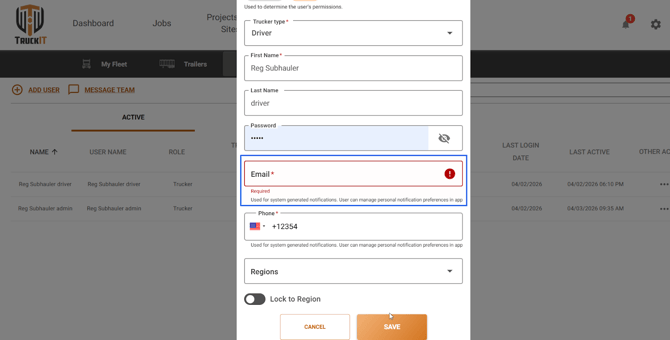
  • An email is now required when editing team members
    We updated the My Team’s edit screen so the email field is now required when making changes. This aligns the portal with existing rules and prevents incomplete updates.


What you might want to do

  • Review: 
    Take a look at each enhancement done on the Web Portal and the Mobile App. They are designed and implemented to streamline workflows, reduce errors, and improve visibility. See which changes can immediately boost your team’s daily efficiency. Small improvements, big impact.

  • Update Mobile App:
    Ensure your team is using the latest version to access new tools and updates.

  • Recommendation: 
    Share this information with dispatchers, drivers, and contractors, so all roles are aware of the improvements. Keeping everyone aligned will help your organization fully benefit from the enhanced clarity, consistency, and reliability across the platform.

Help & Support