
TruckIT · Customers & Access

Summary
TruckIT gives you three ways to control what an outside company or contact can see and do on a project: Customer, Restricted Customer, and Granted Access. Choosing the right one keeps back-office tracking clean and makes sure partners get exactly the access they need — no more, no less.
| Access Type | Best For | What They Can Do |
|---|---|---|
| Customer | Tracking a customer on projects and tickets | Appears on projects and tickets for back-office tracking |
| Restricted Customer | Giving a customer read-only visibility | Can view assigned projects and tickets, but can’t make changes or dispatch |
| Granted Access | Giving another company with Full Access to TruckIT full project access | Can use the project like their own, including adding payloads and dispatching |
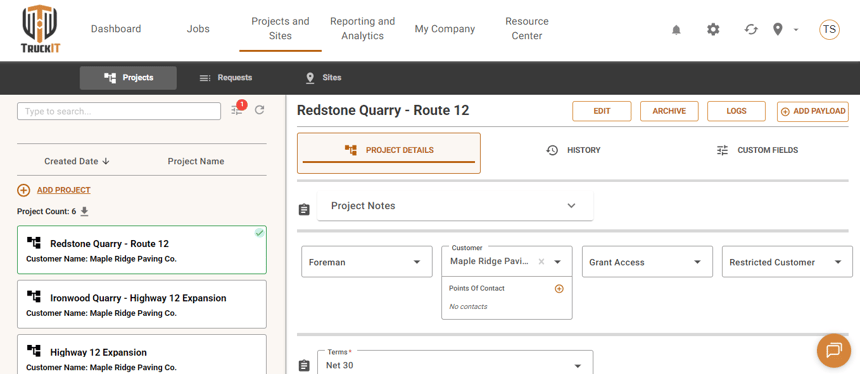
Customer, Restricted Customer, and Grant Access are all set from the project’s Project Details screen (Projects and Sites > Projects).
What Is a Customer?
A standard Customer only works as a label. When you assign a customer to a project, that customer can appear on related tickets and help your back-office team organize project and ticket records — but they don’t get portal access.
Customers are added from Settings > Customers > Add Customer.
Use a standard Customer when:
- You need the customer name attached to projects or tickets
- The customer doesn’t need to log in or see project activity
- Your back-office team needs the name for records, billing, or reporting
If you need a contact for that customer, open the customer from Settings > Customers, then use the Add Customer Contact button while editing them to add a name, email, and phone number.
What Is a Restricted Customer?
A Restricted Customer is a customer with view-only access. They can log in and view only the projects they’re assigned to, including project activity and tickets — but they can’t change project information or dispatch work. Use this when a customer needs visibility but shouldn’t be able to edit, dispatch, or manage project setup.
A Restricted Customer can:
- Log in to TruckIT
- View assigned projects
- View tickets for assigned projects
- See tracking and other project updates
A Restricted Customer cannot:
- Dispatch jobs or add payloads
- Edit project details
- Change your company’s TruckIT data
- View projects they haven’t been assigned to
How setup works
1. Go to Settings > Customers, then add or select the customer.
2. Choose Make Restricted, then open the Restricted Customers tab.
3. Use the login icon under Other Actions to log in as the restricted customer and add a team member for that account.
4. Share the username and password with the restricted customer.
5. Assign the restricted customer to the appropriate project — they can then log in and view it.
To add a point of contact for that restricted customer, the restricted customer must log in and go to Settings > Points of Contact to add one themselves — only then will that contact be visible and available to add elsewhere.
What Is Granted Access?
A Grant Access Customer can log in to the platform and access the project they’ve been added to. They can dispatch the project as if it were their own, and the project is also visible on their account.
Important: Grant Access Customers aren’t part of the base package — the customer must be a TruckIT client to use this feature. Contact our support team at support@truckit.com for access.
A company with Granted Access can:
- View the granted project
- Add payloads and dispatch jobs
- Use full project functionality, similar to a project they created themselves
A project with Granted Access shows Granted By: followed by the parent company name — otherwise it looks and functions like a normal project for the company receiving access.
Adding a point of contact works the same way as it does for a Restricted Customer: the Grant Access Customer must log in and go to Settings > Points of Contact to add one themselves — only then will that contact be visible and available to add to a project.
Choosing the Right Customer
| If the User Needs To… | Use This |
|---|---|
| Be listed on projects and tickets for tracking | Customer |
| View assigned project activity or tickets only | Restricted Customer |
| Add payloads or dispatch work on the project | Granted Access |
| Manage the project like their own | Granted Access |
Best Practices
Use the least amount of access needed for the workflow:
- Use Customer for tracking only
- Use Restricted Customer for view-only visibility
- Use Granted Access only when another company with Full Access to TruckIT needs to take action on the project
- Confirm the receiving company and project before granting access
- Review customer and access settings when a project ends
Tip: train your team on the difference between customer tracking and project access — avoid giving full access when read-only visibility is enough.
 Questions? support@truckit.com